When shopping for smart home technology, you will often see terms such as Matter, Thread, Zigbee and Wi-Fi. These technologies help smart devices communicate, but they do not all do the same job.
Understanding the differences can save you money, prevent compatibility problems and help you build a smart home that works reliably.
Whether you are buying smart bulbs, security sensors, cameras or heating controls, knowing which technology a device uses can make choosing the right equipment much easier.
In this guide, we explain Matter, Thread, Zigbee and Wi-Fi in straightforward terms, including how they work together and which ones are worth considering for a UK smart home.
Why do smart home devices use different technologies?
Smart home products need a way to communicate with your phone, network, hub or other connected devices.
Different technologies have been developed to suit different requirements.
For example:
- Wi-Fi provides a familiar way to connect devices to your home network.
- Zigbee is designed for low-power smart home devices.
- Thread provides low-power mesh networking.
- Matter helps compatible smart home products work across supported platforms.
Some technologies are alternatives, while others work together.
This is why checking a product’s specifications is important before purchasing it.
What is Wi-Fi?
Wi-Fi is probably the smart home technology you already know best.
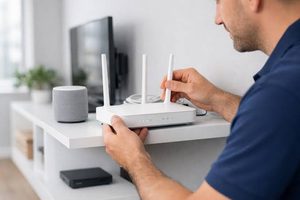
Your home router connects devices to your local network, allowing them to communicate with each other and access the internet where required.
Many smart home products use Wi-Fi, including:
- Smart security cameras
- Video doorbells
- Smart plugs
- Smart televisions
- Some smart bulbs
- Smart speakers
Advantages of Wi-Fi
Easy to understand: Most households already have a Wi-Fi router, so additional equipment is not always necessary.
Direct connectivity: Many products connect directly to your existing network.
Higher bandwidth: Wi-Fi is suitable for devices that transfer larger amounts of data, such as security cameras.
Disadvantages of Wi-Fi
Network congestion: A large number of connected devices can increase demands on your wireless network.
Power consumption: Wi-Fi is generally less suitable for small battery-powered sensors that need to operate for long periods.
Coverage limitations: Devices still need a sufficiently strong connection to your router or access point.
Wi-Fi is a sensible choice for many smart home devices, particularly cameras and products that need to transfer larger amounts of data.
What is Zigbee?
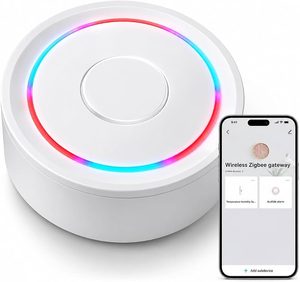
Zigbee is a low-power wireless communication technology commonly used in smart home products.
It is particularly popular for devices such as:
- Smart bulbs
- Motion sensors
- Door and window sensors
- Smart switches
- Temperature sensors
Unlike ordinary Wi-Fi devices, Zigbee products generally communicate through a compatible Zigbee coordinator or hub.
How does Zigbee work?
Zigbee can create a mesh network.
In simple terms, compatible powered devices can pass messages between one another, helping extend the network around your home.
For example, a smart bulb in one room may help pass a signal to another compatible device further away.
Battery-powered devices generally do not act as mesh routers.
Advantages of Zigbee
- Low power consumption.
- Suitable for battery-powered sensors.
- Mesh networking can improve coverage.
- Widely used in smart home lighting and automation.
Disadvantages of Zigbee
- A compatible coordinator or hub is generally required.
- Not every Zigbee device works with every hub.
- Setup and compatibility can vary between manufacturers.
Zigbee is worth considering if you want to build a smart home with lots of sensors, lights and automation devices.
What is Thread?

Thread is another low-power wireless networking technology designed for connected devices.
Like Zigbee, it supports mesh networking, allowing compatible devices to communicate through neighbouring devices.
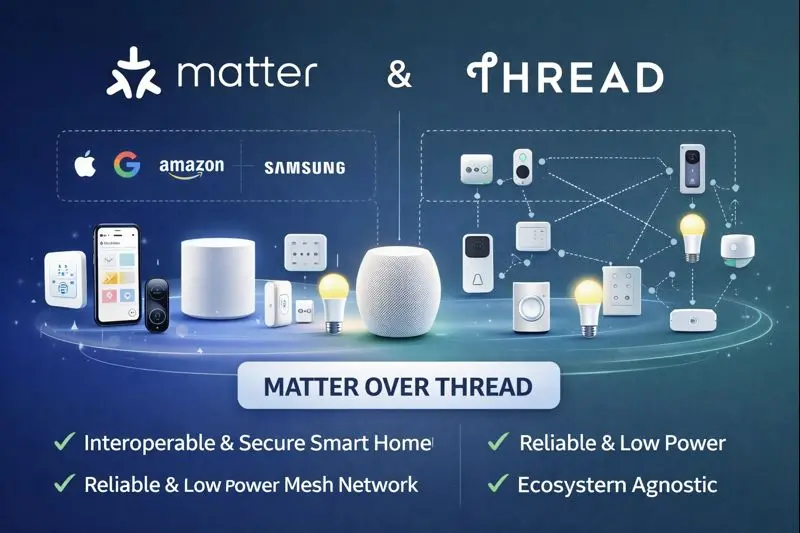
Thread is particularly important in newer smart home products and plays a key role in the Matter ecosystem.
How does Thread work?
Thread creates a secure mesh network using compatible devices.
A Thread Border Router connects the Thread network to your wider home network.
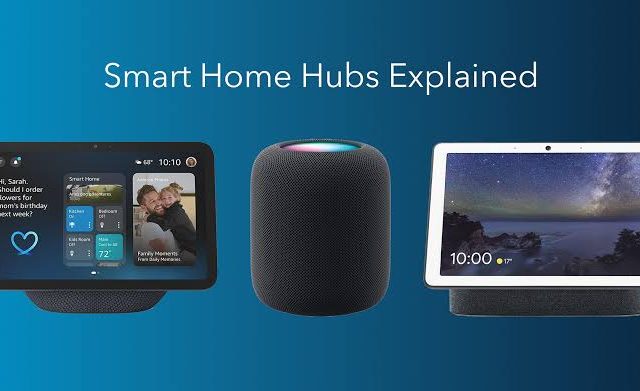
Some smart speakers, displays and other smart home equipment include Thread Border Router functionality.
This means you may already own a device capable of supporting Thread without realising it.
Advantages of Thread
- Low power consumption.
- Designed for reliable mesh networking.
- Suitable for many battery-powered smart home devices.
- Supports modern Matter-based smart home setups.
- Does not depend on every device communicating directly with your Wi-Fi router.
Disadvantages of Thread
- You need suitable Thread infrastructure.
- Not all smart speakers and hubs include Thread support.
- Compatibility still depends on the device and platform.
Thread is particularly worth understanding if you are buying newer smart home equipment.
What is Matter?

Matter is different from Wi-Fi, Zigbee and Thread.
It is a smart home connectivity standard designed to improve compatibility between devices from different manufacturers.
Its purpose is to make it easier for supported products to work across different smart home platforms.
For example, a Matter-compatible smart plug may work with supported Amazon Alexa, Google Home and Apple Home setups.
This can reduce the risk of buying a product that only works within one manufacturer’s ecosystem.
How does Matter work?
Matter operates over supported network technologies, including Wi-Fi and Thread.
It provides a common way for compatible devices and platforms to communicate.
For example:
- You purchase a Matter-compatible smart plug.
- You connect it using a supported Matter platform.
- You add it to your compatible smart home system.
- You control it through the supported app or voice assistant.
The exact setup depends on the product and platform.
Advantages of Matter
- Designed to improve cross-platform compatibility.
- Supported by major smart home ecosystems.
- Can simplify adding compatible devices.
- Supports both Wi-Fi and Thread connections.
Disadvantages of Matter
- Not every smart home product supports it.
- Supported device types and features vary.
- Some devices still need compatible controllers or Thread Border Routers.
- Matter support does not guarantee that every advanced feature works across every platform.
Matter is an important development for smart homes, but it is not a guarantee that every device will work with every system.
Matter vs Thread: What’s the difference?
This is one of the most common sources of confusion.
Matter and Thread are not competing technologies.
They perform different jobs.
| Technology | What it does |
|---|---|
| Matter | Provides a common smart home communication standard |
| Thread | Provides a low-power wireless mesh network |
| Zigbee | Provides a separate low-power wireless smart home network |
| Wi-Fi | Connects devices to your home network |
Think of Thread as the network a device uses to communicate and Matter as the common language compatible devices use to understand one another.
A Matter device can use Wi-Fi or Thread, depending on the product.
Can Matter, Thread, Zigbee and Wi-Fi work together?
Yes, although they do not all connect directly in the same way.
A modern smart home can contain several technologies at once.
For example:
- Security cameras connected through Wi-Fi.
- Smart bulbs communicating through Zigbee.
- Battery-powered sensors using Thread.
- Matter-compatible smart plugs controlled through your preferred smart home platform.
A suitable smart home hub or platform can bring compatible products together.
However, Zigbee devices do not automatically become Matter devices simply because they connect to a hub. The hub must support the appropriate integration.
Always check the supported devices and features before purchasing.
Which technology should you choose for your smart home?
There is no single best technology for every product.
Beginner-friendly smart home products to look at
If you’re ready to explore actual products, here are some examples from familiar brands. These are starting points to research, not product rankings or hands-on reviews.
1. Smart plugs – TP-Link Tapo P110M
Example: TP-Link Tapo P110M Matter Smart Plug
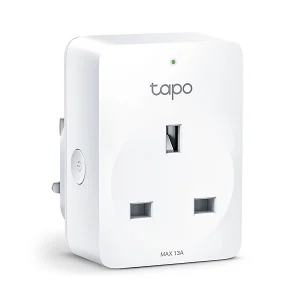
A simple way to start is with a smart plug. Plug in a suitable lamp or appliance and control its power through the Tapo app.
- Connects using Wi-Fi.
- Supports Matter.
- Works with supported Alexa, Google Home and Apple Home setups.
- Includes energy monitoring through the Tapo app.
Best for: Beginners who want to control an ordinary lamp or check the energy consumption of a suitable appliance.
2. Smart lighting – Philips Hue
Example: Philips Hue Starter Kit with Bridge
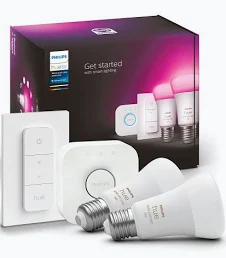
Philips Hue is a popular smart lighting system. A starter kit can include smart bulbs and a Bridge to connect and control your lighting.
- Control lights using an app.
- Create schedules and lighting routines.
- Add compatible motion sensors and switches.
- Expand your lighting setup over time.
Best for: Beginners who want to upgrade the lighting in one or more rooms.
3. Smart sensors – Aqara
Example: Aqara motion and door sensors
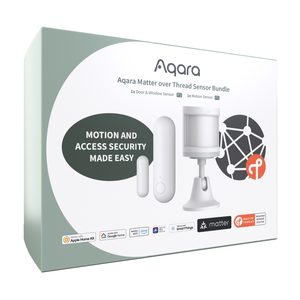
Aqara offers small sensors that can detect movement or tell you when a door or window opens.
- Create movement-based automations.
- Receive alerts from compatible systems.
- Use sensors to trigger compatible lights.
- Check the required Aqara hub and connectivity for each model.
Best for: People who want to introduce simple security alerts and automatic lighting.
4. Smart cameras – TP-Link Tapo
Example: TP-Link Tapo indoor Wi-Fi cameras
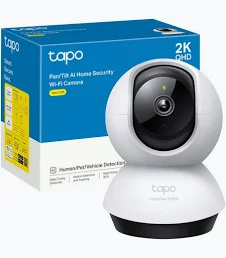
An indoor Wi-Fi camera is another straightforward way to introduce smart technology.
- View compatible camera feeds through an app.
- Receive supported motion notifications.
- Check live footage remotely.
- Review storage options and any subscription requirements before buying.
Best for: Beginners who want to monitor an indoor area of their home.
Which products should you buy first?
If you’re completely new to smart home technology, we recommend starting small:
- Buy one smart plug to learn how app control works.
- Add a smart bulb to experiment with schedules and lighting.
- Consider a motion sensor when you want to automate something.
- Add cameras or more advanced equipment when you have a specific need.
You don’t need to buy everything at once.
Important: Product models, connectivity and compatibility can vary. Always check the exact model’s UK specifications, whether a hub is required and whether it works with your chosen smart home platform before ordering.
The right choice depends on what you are buying and how you want your home to work.
| Device type | Technology worth considering | Why |
|---|---|---|
| Security cameras | Wi-Fi | Suitable for transferring video |
| Video doorbells | Wi-Fi | Commonly used for video and notifications |
| Smart bulbs | Zigbee, Thread or Wi-Fi | Depends on the lighting system and setup |
| Motion sensors | Zigbee or Thread | Low-power operation |
| Door and window sensors | Zigbee or Thread | Suitable for battery-powered devices |
| Smart plugs | Wi-Fi, Zigbee or Matter | Several connectivity options are available |
| Smart heating controls | Varies by manufacturer | Compatibility with your heating system is essential |
This table is a general guide rather than a guarantee of compatibility. Always check the exact product specifications.
What should UK buyers check before purchasing?
Before buying smart home products, consider these points.
1. Check your existing equipment
Look at your current router, smart speakers and hubs.
You may already have some of the connectivity features you need.
2. Check whether a hub is required
Some products work independently, while others require a compatible coordinator or controller.
Do not assume that every smart device needs a separate hub.
3. Look for Matter compatibility
If you want flexibility between supported smart home platforms, Matter compatibility can be useful.
Check which device features are supported rather than relying on the logo alone.
4. Check Thread Border Router support
If you are purchasing Thread devices, make sure you have suitable Thread infrastructure.
A normal Wi-Fi router does not automatically provide Thread connectivity.
5. Consider your Wi-Fi coverage
A smart camera or doorbell positioned far from your router may struggle if the signal is weak.
Improve your Wi-Fi coverage before assuming the device itself is faulty.
6. Think about future expansion
Choosing compatible devices from the beginning can make expanding your smart home easier.
You do not need to purchase everything at once, but it helps to have a clear idea of the system you want to build.
Frequently asked questions
Is Matter better than Zigbee?
Neither is automatically better. Matter improves compatibility between supported smart home platforms, while Zigbee is a wireless networking technology. They serve different purposes.
Does Matter use Wi-Fi?
Matter can operate over Wi-Fi or Thread. The connection method depends on the device.
Do I need a Thread Border Router?
You need a compatible Thread Border Router to connect Thread devices to the wider home network. Some smart home hubs and speakers already include this functionality.
Can I use Zigbee and Matter together?
Yes. A compatible smart home hub or platform can integrate supported Zigbee devices with a Matter-based smart home system. The integration depends on the equipment and its software.
Is Wi-Fi enough for a smart home?
For a small setup, Wi-Fi may be perfectly adequate. If you add lots of battery-powered sensors and automation devices, Zigbee or Thread may be worth considering.
Does Matter work with Alexa and Google Home?
Yes. Both platforms support Matter-compatible devices, although the exact features and setup requirements depend on the product and the specific platform.
Final thoughts
Matter, Thread, Zigbee and Wi-Fi all play important roles in modern smart homes.
Wi-Fi remains useful for cameras and devices that need more bandwidth. Zigbee provides a popular option for low-power sensors and lighting. Thread offers modern mesh networking, while Matter aims to make compatible devices work more easily across different smart home platforms.
You do not need to understand every technical detail before building a smart home.
Start by choosing the devices you actually need, check their compatibility and make sure your existing equipment supports the connections they require.
A little planning now can save money and frustration as your smart home grows.
At SmartHomeNest UK, our aim is to make smart home technology easier to understand so you can make informed decisions before buying.