Smart home technology can make your property more convenient and secure, but every internet-connected device needs protecting.
Smart cameras, video doorbells, smart speakers, lighting and heating controls all connect to your home network. If they aren’t configured properly, they can introduce security and privacy risks.
The good news is that you don’t need to be a technology expert to improve your smart home’s security.
Here are ten practical steps to help protect your connected devices.
1. Use strong, unique passwords
One of the simplest ways to improve smart home security is to use strong passwords.
Avoid using the same password for your router, smart home applications and manufacturer accounts.
A good password should:
- Be long and difficult to guess.
- Avoid personal information such as birthdays.
- Not be reused across different accounts.
- Be stored securely using a reputable password manager.
If a service supports passkeys, consider using them as an alternative to traditional passwords.
2. Enable two-factor authentication
Two-factor authentication adds another layer of protection to your accounts.
Even if someone discovers your password, they may still be unable to access your account without the additional verification step.
Enable it wherever available, particularly for:
- Security camera accounts.
- Video doorbell applications.
- Smart home hubs.
- Email accounts linked to your devices.
- Router administration accounts.
Use an authenticator application or another secure verification method supported by the manufacturer.
3. Secure your home Wi-Fi network
Your Wi-Fi router is one of the most important parts of your smart home security.
If someone gains unauthorised access to your network, connected devices could be exposed.
Make sure you:
- Change the router’s default administrator password.
- Use WPA2-AES or WPA3 security where supported.
- Set a strong Wi-Fi password.
- Keep router firmware updated.
- Disable WPS if you don’t need it.
- Disable remote administration unless you have a specific secure reason to use it.
Avoid using outdated wireless security standards such as WEP.
4. Keep device firmware updated
Manufacturers regularly release firmware updates to fix security vulnerabilities, improve reliability and introduce improvements.
Check for updates through the official device application or manufacturer’s website.
Pay particular attention to:
- Security cameras.
- Video doorbells.
- Smart hubs.
- Routers.
- Smart speakers.
- Network-connected storage devices.
Where possible, enable automatic updates.
If a manufacturer no longer provides security updates, consider replacing the device, particularly if it handles sensitive information or performs an important security function.
5. Buy from reputable manufacturers
A low purchase price isn’t always worth the risk if a manufacturer provides poor security support.
Before buying a smart home product, investigate:
- Whether the manufacturer has a clear privacy policy.
- How long security updates are provided.
- Whether the product supports secure authentication.
- Where personal data is stored.
- Whether the manufacturer offers technical support.
Look for manufacturers with a clear track record of maintaining their products.
Be cautious with devices that have little documentation or require unnecessary permissions.
6. Protect your smart cameras and video doorbells
Security cameras can collect particularly sensitive information about your household.
Make sure:
- Camera accounts use strong passwords.
- Two-factor authentication is enabled.
- Firmware is kept updated.
- Recording access is restricted to trusted users.
- Cloud storage settings are understood.
- Unnecessary sharing features are disabled.
Check camera positioning carefully too.
For UK households, cameras that capture areas beyond your property may bring data protection responsibilities into consideration. The Information Commissioner’s Office (ICO) provides guidance on domestic CCTV.
7. Consider a separate IoT network
If your router supports it, consider placing smart home devices on a separate network.
This is sometimes called an IoT network.
Separating smart devices from your main computers and personal devices can reduce the potential impact of a compromised device.
However, simply creating another Wi-Fi name doesn’t necessarily provide security isolation.
Check that your router supports proper network separation and understand its device-to-device access settings.
Some smart home hubs and controllers need to communicate with other devices, so configure isolation carefully to avoid breaking automations.
8. Review connected applications and permissions
Smart home products often rely on mobile applications and third-party integrations.
Over time, you may connect services that you no longer use.
Periodically review:
- Which applications have access to your smart home.
- Which household members have administrator access.
- Which third-party integrations are connected.
- Whether old devices remain registered.
- Whether unnecessary microphone or camera permissions are enabled.
Remove accounts and integrations you no longer need.
Only give applications the permissions necessary for their intended functions.
9. Disable features you don’t use
Many smart home products include additional features that you might never need.
Leaving unnecessary services enabled can increase the number of potential security weaknesses.
Where appropriate, consider disabling:
- Unused remote access features.
- Unnecessary voice purchasing.
- Unused device sharing.
- Unneeded cloud integrations.
- Unused network services.
Always check what a feature does before disabling it, as some functions may be necessary for normal operation.
10. Replace unsupported devices
Smart home technology doesn’t last forever.
Manufacturers sometimes stop providing firmware updates, discontinue cloud services or withdraw support for older products.
An unsupported device may continue working, but it could become increasingly difficult to maintain securely.
If a product no longer receives security updates, consider replacing it.
This is especially important for devices that monitor entrances, store video recordings or have access to your home network.
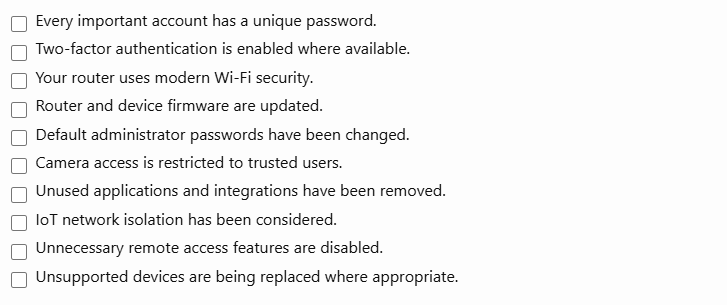
Smart home security checklist
Use this checklist to review your setup:
Final thoughts
A smart home should make your property more convenient without creating unnecessary security risks.
You don’t need expensive equipment to improve your protection. Strong passwords, two-factor authentication, regular updates and a properly secured router provide an excellent starting point.
Take time to review your connected devices regularly, remove anything you no longer use and choose manufacturers that take security seriously.
At SmartHomeNest UK, we believe that a smarter home should also be a safer home.