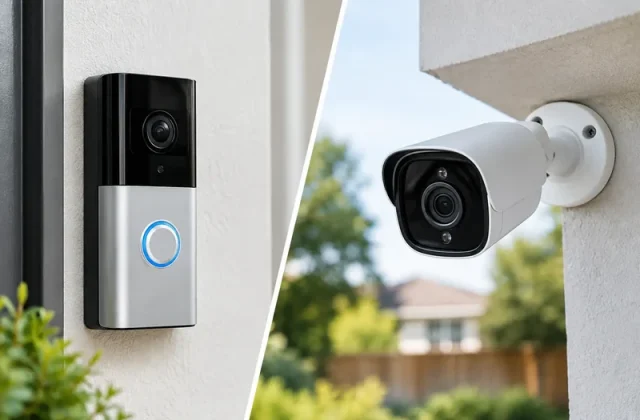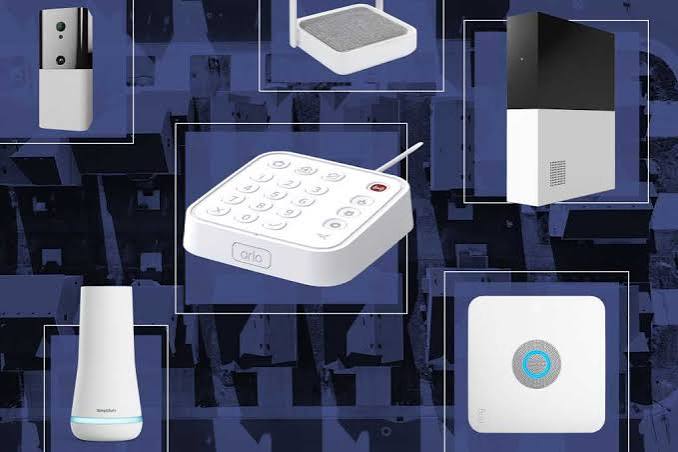
Protecting your home is about more than installing a security camera or buying a video doorbell. A complete smart home security system can combine burglar alarms, motion sensors, door contacts, cameras and smartphone notifications to help you monitor your property.
But should you install a DIY smart alarm yourself, or pay for a professionally installed and monitored security system?
For UK households, the right choice depends on your property, budget, insurance requirements and the level of protection you want.
This guide explains the differences, what equipment you actually need and how to avoid paying for features you may never use.
What Is a Smart Home Security System?
A smart home security system is a collection of connected devices designed to detect potential security problems and alert you when something unusual happens.
Unlike traditional standalone burglar alarms, many smart systems allow you to monitor and control your security equipment through a smartphone app.
A typical system might include:
- A central alarm hub or control panel.
- Door and window contact sensors.
- Indoor motion detectors.
- An external alarm siren.
- A keypad for arming and disarming.
- Security cameras.
- A video doorbell.
- Smartphone alerts and notifications.
Some systems also support smart locks, automation routines and backup communication if your broadband connection fails.
Not every system includes all these features.
DIY vs Professionally Monitored Security Systems
There are three common approaches to home security.
1. DIY Self-Monitored Systems
A DIY system is usually purchased as a kit and installed by the homeowner.
When an alarm is triggered, it can sound a siren and send notifications to your phone.
You are responsible for checking the alert and deciding what action to take.
Advantages:
- Often lower initial installation costs.
- Flexible equipment choices.
- Usually straightforward to expand.
- Some systems work without monthly subscriptions.
- Suitable for many homeowners and renters.
Disadvantages:
- You are responsible for responding to alerts.
- Installation and maintenance are your responsibility.
- Some features depend on internet connectivity.
- Police response is not automatically provided.
DIY systems can be a practical choice for households wanting basic security without a long-term monitoring contract.
2. Professionally Installed, Self-Monitored Systems
Some households prefer a professional installer to fit and configure the alarm but still manage notifications themselves.
This can be useful if you want a correctly positioned and professionally configured system without full monitoring.
However, professional installation does not automatically mean that the system qualifies for police response or meets your insurer’s requirements.
3. Professionally Monitored Systems
A professionally monitored alarm sends qualifying alarm signals to an alarm receiving centre.
Depending on the service and system, trained operators may assess the alarm, contact nominated keyholders or request an appropriate emergency response.
Advantages:
- Monitoring support may be available around the clock.
- Trained operators can assess qualifying alarms.
- Suitable systems may meet specific insurance requirements.
- Some services offer police-response arrangements.
Disadvantages:
- Higher ongoing costs.
- Installation and maintenance contracts may apply.
- Not every alarm qualifies for police response.
- Contract terms and cancellation conditions vary.
Important: Paying for professional monitoring does not guarantee police attendance. UK police response depends on the system, applicable standards, verification procedures, registration and operational priorities.
DIY vs Professional Monitoring: Quick Comparison
| Feature | DIY self-monitoring | Professional monitoring |
|---|---|---|
| Installation | Usually self-installed | Often professionally installed |
| Initial cost | Often lower | Often higher |
| Monthly fees | May be optional | Usually required |
| Smartphone alerts | Common | Often included |
| Alarm assessment | You or your contacts | Monitoring service |
| Police response | Not automatically arranged | Possible with qualifying systems |
| Maintenance | Usually your responsibility | May be included in contract |
| Best suited to | Budget-conscious households | Higher security or insurance requirements |
7 Essential Devices for a Smart Home Security System
1. Alarm Hub or Control Panel
The hub is the central part of many smart alarm systems.
It communicates with compatible sensors and manages alarm settings.
Some hubs also include backup batteries or mobile-network connectivity.
Before buying, check what happens if your internet connection or electricity supply fails.
2. Door and Window Sensors
Contact sensors detect when a door or window opens.
They are particularly useful for:
- Front doors.
- Back doors.
- Patio doors.
- Accessible ground-floor windows.
- Other vulnerable entry points.
For many households, protecting likely entry points is a sensible starting point.
3. Motion Sensors
Motion detectors monitor movement within a room or area.
They can help detect activity after someone enters the property.
If you have pets, look for suitable pet-tolerant sensors, but remember that performance depends on the animal, positioning and manufacturer’s guidance.
4. External Alarm Siren
An external siren provides an audible warning when an alarm is triggered.
Some systems also include flashing lights.
Choose a properly rated product suitable for outdoor installation.
5. Security Cameras
Cameras can help you check activity around your property.
Common locations include entrances, driveways and gardens.
Useful features include night vision, motion detection and secure recording.
Cameras are valuable additions, but they do not replace a burglar alarm.
6. Smart Video Doorbell
A video doorbell lets you see and communicate with visitors remotely.
It can also help monitor deliveries and activity near your front entrance.
However, a doorbell is not a complete security system on its own.
7. Keypad or Remote Control
A keypad makes it easier to arm or disarm the alarm without relying entirely on a smartphone.
This can be particularly convenient for households with multiple family members.
Some systems also offer key fobs or compatible presence-based controls.
Popular Smart Home Security Brands in the UK
The following are examples of brands and systems worth researching. They are not hands-on reviews or a verified ranking.
Ring Alarm
Ring offers DIY alarm equipment that can work alongside compatible Ring cameras and doorbells.
Depending on the equipment and subscription, features can include:
- Contact and motion sensors.
- Alarm sirens.
- Smartphone notifications.
- Alexa integration.
- Optional automated calls to nominated contacts.
Important UK distinction: Ring’s Alarm Calls service can notify nominated emergency contacts, but it is not the same as Ring’s North American professional alarm monitoring service.
Check Ring’s current UK subscription options before purchasing.
Yale Smart Alarm Systems
Yale offers smart alarm systems aimed at domestic security.
Selected systems include smartphone control, motion sensors, contact sensors and additional accessories.
Different Yale product ranges may have different compatibility and subscription arrangements.
Check the exact model and features before buying.
Ajax Security Systems
Ajax offers wireless security equipment that is commonly supplied through security installers, although installation arrangements vary.
Its product range includes alarm hubs, motion detectors, contact sensors and sirens.
Some configurations can be connected to professional monitoring services.
Check the proposed installation, monitoring agreement and certification with the supplier.
SimpliSafe
SimpliSafe offers home alarm equipment with self-monitoring and optional service arrangements that vary by market and plan.
Before purchasing in the UK, verify the current availability of the equipment, monitoring options, included features and subscription conditions.
Professionally Installed Alarm Systems
If you need an insurer-approved or police-response-capable system, consider obtaining quotes from accredited installers.
The National Security Inspectorate (NSI) and Security Systems and Alarms Inspection Board (SSAIB) are two recognised UK security certification bodies.
How Much Does a Smart Home Security System Cost?
The total cost depends on the number of sensors, equipment quality, installation and monitoring arrangements.
Instead of looking only at the purchase price, calculate the cost over several years.
Example: DIY System
Imagine a DIY security kit costs £250 and has no mandatory monitoring subscription.
| Expense | Example cost |
|---|---|
| Initial equipment | £250 |
| Installation | £0 if self-installed |
| Monthly monitoring | £0 |
| Three-year total | £250 |
Example: Monitored System
Now imagine a professionally installed system costs £500 upfront, with monitoring at £25 per month.
| Expense | Example cost |
|---|---|
| Equipment and installation | £500 |
| Monitoring over 36 months | £900 |
| Three-year total | £1,400 |
These figures are illustrative calculations, not current supplier quotations. They exclude potential servicing, repairs, additional equipment and contract charges.
The monitored example costs £1,150 more over three years, but it offers a different level of service.
The important question is whether that additional service is necessary for your household.
Do You Really Need Professional Monitoring?
Not every household needs it.
A self-monitored alarm may be suitable if:
- You are comfortable receiving and checking alerts.
- You have trusted contacts who can help when necessary.
- Your insurance does not require a monitored system.
- You want to minimise ongoing costs.
Professional monitoring may be worth considering if:
- Your property is frequently unoccupied.
- You have high-value possessions.
- Your insurer requires a particular alarm specification.
- You want trained operators to assess qualifying alarms.
- You need a system designed for an appropriate police-response arrangement.
For a high-risk property, discuss your requirements with an accredited security installer.
Does a Smart Alarm Work Without Wi-Fi?
This depends on the equipment.
Some alarm systems use dedicated wireless connections between their sensors and hub, rather than relying on your household Wi-Fi for every device.
However, remote notifications and monitoring may still require internet or mobile-network connectivity.
Look for:
- Backup batteries.
- Cellular backup options.
- Local siren operation.
- Notifications after connectivity is restored.
- Clear guidance about power failures.
A good security system should have a documented response to common failures.
Can Smart Security Systems Reduce Home Insurance Costs?
Possibly, but discounts are not guaranteed.
Some UK insurers may offer different terms where a property has a suitable approved alarm.
Others may require a specific standard of installation, servicing or monitoring.
Before buying an alarm for insurance purposes, ask your insurer:
- Is an alarm required for my policy?
- Must it be professionally installed?
- Does the installer need NSI or SSAIB certification?
- Is professional monitoring required?
- Must the alarm be armed whenever the property is empty?
- Are regular maintenance inspections required?
Do not assume that an ordinary DIY smart alarm will satisfy a policy condition.
Smart Home Security for Renters
Renters can still improve security without making major changes to their property.
Possible options include:
- Battery-powered contact sensors.
- Freestanding indoor cameras.
- Removable smart alarm equipment.
- Portable alarm keypads.
- Smart lighting schedules.
Check your tenancy agreement and obtain permission where installation would alter the property.
Be particularly careful with cameras in shared entrances, communal hallways or other areas where privacy issues may arise.
Smart Home Security and UK Privacy
Security cameras and video doorbells should be positioned responsibly.
Where possible, restrict recording to your own property.
If your cameras capture identifiable people beyond your domestic property boundary, such as on public pavements or neighbouring property, UK data protection obligations may apply.
Consider:
- Privacy masking.
- Appropriate recording zones.
- Secure passwords and multi-factor authentication.
- Limited video retention.
- Disabling unnecessary audio recording.
- Keeping firmware updated.
For official guidance, see the Information Commissioner’s Office:
Common Mistakes to Avoid
Buying Cameras Instead of an Alarm
Cameras help you observe and review activity, but they do not necessarily detect an intruder entering through a door or window.
Ignoring Ongoing Costs
Monitoring, cloud storage and maintenance contracts can significantly increase the total price.
Assuming Monitoring Guarantees Police Attendance
Only qualifying arrangements can provide an appropriate police-response pathway, and attendance is not guaranteed.
Leaving Entry Points Unprotected
A system with several cameras but no door sensors may leave important gaps.
Forgetting Backup Power
Consider how your alarm behaves during a power cut.
Failing to Test the System
Test sensors, sirens and notifications according to the manufacturer’s instructions.
Using Weak Account Security
Enable multi-factor authentication where supported and use unique passwords.
A Simple Security Setup for a Typical UK Home
For a small or medium-sized house, a sensible starting arrangement could include:
| Location | Suggested device |
|---|---|
| Front door | Contact sensor |
| Back door | Contact sensor |
| Main hallway | Motion detector |
| Living room | Motion detector if appropriate |
| Front entrance | Video doorbell or camera |
| Exterior | Alarm siren |
| Central location | Alarm hub and keypad |
This is an illustrative layout, not a professional security survey.
Larger homes, unusual layouts and higher-risk properties may need a different arrangement.
Frequently Asked Questions
Are DIY smart alarms reliable?
Many can be reliable when correctly installed and maintained. Reliability depends on equipment quality, sensor placement, batteries, connectivity and regular testing.
Do I need a subscription for a smart alarm?
Not always. Some systems provide basic alarm operation without a subscription, while advanced features or monitoring may cost extra.
Can a smart alarm call the police automatically?
Do not assume so. Formal police-response arrangements have specific requirements, and a basic smartphone alert does not qualify.
Can I install a security system myself?
Many consumer DIY systems are designed for self-installation. Systems with particular insurance or police-response requirements may need accredited professional installation.
Should I buy security cameras or an alarm first?
For intrusion detection, protecting entry points with suitable alarm sensors is often a sensible priority. Cameras can complement those sensors.
Is professional monitoring worth the monthly cost?
It may be worthwhile for properties with higher security requirements, specific insurance conditions or owners who want a monitored response process.
Final Verdict: DIY or Professional Monitoring?
For many ordinary UK households, a well-planned DIY smart alarm can provide useful security features without expensive installation or mandatory monitoring fees.
Start with a reliable hub, contact sensors for important doors and appropriately positioned motion detectors.
Add cameras or a video doorbell where they provide genuine value.
Professional monitoring becomes more attractive when your property has higher security requirements, your insurance demands it or you want a dedicated alarm assessment service.
The best security system is one that suits your property, is correctly installed and is consistently used.
Continue Improving Your Home Security
Explore more helpful SmartHomeNest UK guides:
Useful UK Resources
- Secured by Design – Burglar Alarms
- National Security Inspectorate
- Security Systems and Alarms Inspection Board
- ICO – Home CCTV Guidance
Affiliate disclosure: Some links on SmartHomeNest UK may be affiliate links. If you purchase through these links, we may earn a commission at no additional cost to you. This helps support our website and allows us to continue creating useful guides.