Smart video doorbells are becoming a popular way for UK households to monitor their front doors, receive delivery notifications and speak to visitors without opening the door.
Whether you’re at work, relaxing upstairs or away on holiday, a compatible video doorbell can send alerts to your smartphone when somebody approaches your property.
But with brands such as Ring, Google Nest, Eufy and TP-Link Tapo offering different models, choosing the right doorbell can be confusing.
Some require monthly subscriptions, others support local video storage, and certain models need existing doorbell wiring.
In this guide, we’ll explain what to look for before buying a smart video doorbell in the UK.
What Is a Smart Video Doorbell?
A smart video doorbell combines a traditional doorbell button with a camera, microphone, speaker and internet connectivity.
Depending on the model, you can:
- See visitors through a smartphone app.
- Receive notifications when someone presses the doorbell.
- Detect movement near your front door.
- Speak to delivery drivers using two-way audio.
- View live footage remotely.
- Record and review video clips.
- Integrate the doorbell with compatible smart home devices.
Some models can also distinguish between people, vehicles, animals and parcels.
However, these advanced features may require a subscription or specific hardware.
Battery vs Wired Video Doorbells: Which Is Better?
One of the first decisions is whether to buy a battery-powered or wired video doorbell.
Battery-Powered Video Doorbells
Battery-powered doorbells are often easier to install because they don’t necessarily require existing doorbell wiring.
Advantages:
- Suitable for many homes without existing doorbell wiring.
- Usually simpler to install.
- Can be positioned more flexibly.
- Convenient for beginners.
Disadvantages:
- Batteries need recharging or replacing.
- Battery life depends on activity, settings and temperature.
- Some recording features may be limited to preserve battery life.
Wired Video Doorbells
Wired doorbells receive power from a compatible electrical supply.
Advantages:
- No routine battery recharging on fully wired models.
- Potentially suitable for more demanding recording features.
- Convenient for long-term installation.
Disadvantages:
- Existing wiring may not be compatible.
- Installation can be more complicated.
- Professional electrical installation may be necessary.
Quick Comparison
| Feature | Battery doorbell | Wired doorbell |
|---|---|---|
| Installation | Usually easier | May require electrical work |
| Recharging | Usually required | Generally not required |
| Existing wiring | Usually optional | Usually required |
| Placement flexibility | Greater | Depends on wiring |
| Recording capabilities | Model-dependent | Model-dependent |
| Best for | Simple installations | Permanent setups |
Our recommendation: For a beginner without existing doorbell wiring, a battery-powered model is often the easiest starting point.
If you already have compatible wiring and want a permanent installation, consider a wired model.
7 Important Features to Look For
1. Video Quality
Video quality affects how clearly you can see visitors and activity outside your home.
Look for clear daytime footage, good night vision and reliable exposure in bright or shaded conditions.
A higher resolution can help, but resolution alone doesn’t guarantee a better picture.
Camera processing, lighting and internet connectivity also matter.
2. Field of View
A wide field of view helps capture more of the area around your front door.
For parcel deliveries, a taller image can be particularly useful.
Some doorbells offer a head-to-toe view, making it easier to see both visitors and packages left on the doorstep.
3. Motion Detection
Motion detection can alert you when somebody approaches your home.
Useful features include:
- Adjustable motion zones.
- Person detection.
- Parcel detection.
- Notification sensitivity settings.
- Options to reduce unnecessary alerts.
These features can help prevent your phone from receiving constant notifications whenever a vehicle passes.
4. Night Vision
A good video doorbell should provide usable footage after dark.
Look for models offering infrared night vision or suitable low-light recording.
For homes with poorly lit entrances, an outdoor light may also improve visibility.
5. Two-Way Audio
Two-way audio lets you speak to visitors through the doorbell’s microphone and speaker.
For example, you could ask a delivery driver to leave a parcel in a safe location.
Audio quality depends on the model, internet connection and surrounding noise.
6. Video Storage
Video storage is one of the biggest differences between smart doorbells.
Common options include:
Cloud storage: Footage is uploaded to the manufacturer’s service. A subscription may be required.
Local storage: Footage is stored on compatible hardware, such as a microSD card, hub or home base.
Limited free history: Some models provide a short period of event history without a paid subscription.
Check whether recording, playback and downloading clips are available without paying monthly fees.
7. Smart Home Compatibility
If you already use Alexa, Google Home or Apple Home, check compatibility before buying.
Some doorbells can display their camera feed on compatible smart displays.
Others support announcements through smart speakers.
Compatibility varies between brands and individual models.
Popular Smart Video Doorbell Brands in the UK
The following brands offer options worth researching. These are examples for comparison, not hands-on reviews or a ranking of tested products.
Ring Video Doorbells
Ring is a well-known name in smart video doorbells and offers both battery-powered and wired options.
Reasons to consider Ring:
- Wide selection of doorbell models.
- Integration with compatible Alexa devices.
- Smartphone notifications and live viewing.
- Optional cloud recording subscriptions.
Things to consider:
Ring’s video recording and playback features generally require a compatible subscription.
You can still use supported live viewing and respond to doorbell notifications without one.
Check Ring’s current subscription terms before purchasing.
Google Nest Doorbells
Google Nest doorbells are particularly relevant to households already using Google Home.
Depending on the model, features may include:
- Person and parcel alerts.
- Google Home integration.
- Two-way communication.
- Event video history.
- Battery or wired installation.
Some features and longer recording history require a Google Home subscription.
Check the exact generation of doorbell, as features differ.
Eufy Video Doorbells
Eufy offers video doorbells with local storage options on selected models.
This can appeal to buyers who want to reduce dependence on recurring cloud storage fees.
Things to consider:
- Storage arrangements differ by model.
- Some require a compatible HomeBase.
- Advanced features may vary.
- Check what happens if the device or local storage is damaged or stolen.
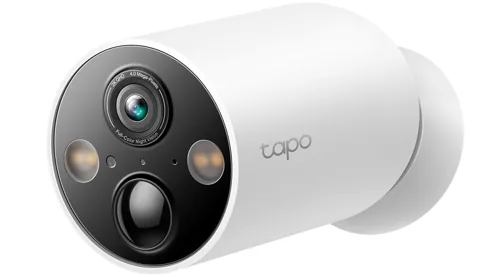
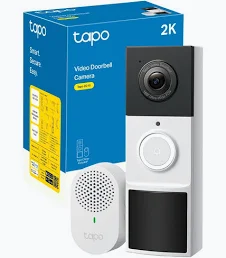
TP-Link Tapo Video Doorbells
TP-Link Tapo offers smart video doorbells that may suit households already using other Tapo smart home products.
Selected models offer:
- Smartphone notifications.
- Two-way audio.
- Motion detection.
- Local storage options.
- Integration with supported smart home platforms.
Check whether a particular model needs a hub and which features require additional equipment or services.
Which Smart Doorbell Should You Choose?
| Your priority | What to look for |
|---|---|
| Easy installation | Battery-powered model |
| No regular subscription | Local recording support |
| Alexa integration | Confirmed Alexa compatibility |
| Google Home integration | Confirmed Google Home compatibility |
| Parcel monitoring | Tall field of view and parcel alerts |
| Minimal maintenance | Compatible wired installation |
| Better privacy controls | Motion zones, privacy masks and secure storage |
The right choice depends on your home, existing devices and whether you’re comfortable paying for ongoing services.
Do Smart Video Doorbells Need a Subscription?
Not always.
Many doorbells provide live viewing and basic notifications without a monthly payment.
However, some manufacturers charge for recorded video history, advanced alerts and additional features.
Before buying, ask:
- Can I see live video without subscribing?
- Can I review recordings without subscribing?
- Where is my footage stored?
- How long are recordings kept?
- Can I download clips?
- What happens if I cancel the subscription?
Example Subscription Cost
If a subscription costs £5 per month, that adds up to:
- £60 over one year.
- £180 over three years.
- £300 over five years.
These are illustrative costs, not a quotation for any particular service.
A cheaper doorbell with an ongoing subscription could cost more over several years than a more expensive model with suitable local recording.
Always compare the total cost of ownership.
Will a Smart Video Doorbell Work With My Wi-Fi?
Most smart video doorbells require a reliable network connection.
A weak Wi-Fi signal near your front door can cause:
- Delayed notifications.
- Slow live video loading.
- Poor video quality.
- Disconnections.
- Missed or delayed events.
Before buying, test your Wi-Fi connection near the intended installation position.
Check whether the doorbell supports your router’s wireless bands. Many models use 2.4GHz Wi-Fi, although support varies.
If your front door has poor coverage, consider improving your home network before installing the doorbell.
For more advice, explore our Networking Guides.
Smart Doorbells and UK Privacy Rules
Video doorbells can help protect your home, but it’s important to respect other people’s privacy.
The Information Commissioner’s Office (ICO) provides guidance covering domestic CCTV and smart doorbells.
Where possible, position your camera so it only captures your own property.
If it records people beyond your property boundary, such as on a public pavement, shared entrance or neighbouring property, data protection law may apply.
Depending on your circumstances, responsibilities can include:
- Limiting recording to what is necessary.
- Displaying appropriate CCTV signage.
- Keeping footage secure.
- Deleting recordings when they are no longer needed.
- Responding appropriately to requests concerning recorded footage.
Consider disabling unnecessary audio recording and using privacy zones where available.
For detailed guidance, visit the ICO’s official home CCTV guidance.
If you rent your home or live in a flat with communal areas, check whether permission is needed before installation.
Are Smart Video Doorbells Worth Buying?
For many UK households, a video doorbell can be a useful addition to home security.
It can help you see who is at the door, respond to visitors remotely and monitor deliveries.
However, it should not be treated as a complete home security system.
A video doorbell cannot physically prevent someone from entering your property or guarantee that every incident will be recorded.
Good locks, suitable lighting and other appropriate security measures remain important.
Common Mistakes to Avoid
Choosing Based Only on Price
An inexpensive doorbell may become costly if essential recording features require a subscription.
Ignoring Wi-Fi Coverage
Poor connectivity can undermine even an expensive camera.
Forgetting About Battery Charging
Battery-powered models need maintenance, and battery life can vary significantly.
Buying Without Checking Compatibility
Not every video doorbell works with every smart home platform.
Ignoring Privacy Settings
Set up motion zones and privacy controls carefully, particularly near neighbouring properties.
Assuming Every Doorbell Records Continuously
Some models record only motion-triggered events, while others support continuous recording under specific conditions.
Always check the recording capabilities of the exact model.
Frequently Asked Questions
Can I install a smart doorbell myself?
Many battery-powered models are designed for straightforward installation. Wired models may require professional help, especially if electrical alterations are necessary.
Can I use a smart doorbell without a subscription?
Yes, depending on the model. However, video history and other features may be restricted.
Do smart doorbells work at night?
Many include infrared night vision or other low-light recording capabilities.
Will a video doorbell work without Wi-Fi?
Most rely on connectivity for remote notifications and live viewing. Some models can retain certain local recording functions during an internet outage, depending on their design.
Can I connect a video doorbell to Alexa?
Some models support Alexa announcements or compatible smart display features. Check the exact model.
Are video doorbells legal in the UK?
Yes, but their use must comply with applicable privacy and data protection requirements, particularly when recording beyond your property boundary.
Final Verdict: What Should UK Buyers Look For?
The best smart video doorbell is not necessarily the most expensive one.
For most beginners, focus on five things:
- Reliable Wi-Fi coverage at the front door.
- A suitable battery or wired installation.
- Clear video and useful motion detection.
- Storage options and ongoing subscription costs.
- Compatibility with your existing smart home devices.
If you want a straightforward installation, start by comparing battery-powered models.
If avoiding subscriptions is important, prioritise models offering suitable local storage.
And if you already use Alexa or Google Home, check that the exact doorbell supports the features you want.
A carefully chosen video doorbell can make everyday life more convenient while providing another useful way to monitor your home’s entrance.
Continue Improving Your Home Security
Explore more advice from SmartHomeNest UK:
Affiliate disclosure: Some links on SmartHomeNest UK may be affiliate links. If you purchase through these links, we may earn a commission at no additional cost to you. This helps support our website and allows us to continue creating useful guides.