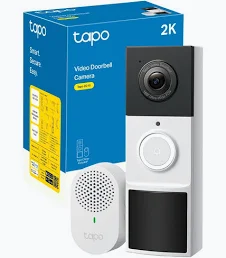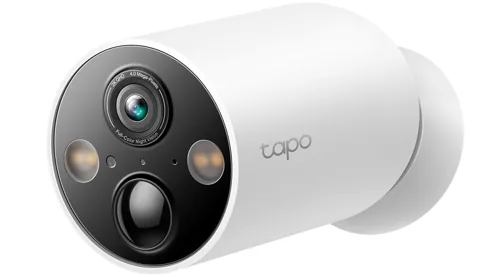
Smart security cameras have become an increasingly popular way to keep an eye on your property. Whether you want to monitor your driveway, garden, front entrance or indoor spaces, there are plenty of connected cameras available for UK homes.
However, choosing the right camera isn’t simply about buying the model with the highest resolution. Storage costs, night vision, connectivity, privacy and installation all matter.
In this guide, we’ll explain what to look for when choosing a smart security camera and how to find one that suits your home.
1. Choose the Right Camera Type
Before comparing specifications, think about where you want to install your camera.
Outdoor security cameras
Outdoor cameras are designed to monitor areas such as:
- Front doors and entrances.
- Driveways and garages.
- Back gardens and patios.
- Side entrances and paths.
Look for weather resistance, suitable mounting options and a reliable power supply.
Indoor security cameras
Indoor cameras can help monitor selected areas inside your home.
Common features include motion detection, two-way audio, night vision and privacy modes.
Choose a camera with clear privacy controls, particularly if it will be installed in a shared living space.
Wired and wireless cameras
Wired cameras usually require a permanent power connection but can avoid the need for regular battery charging.
Battery-powered cameras are often easier to install and position, although battery life depends on usage, settings and environmental conditions.
Some models also support solar panels or Power over Ethernet (PoE).
2. Understand Camera Resolution
Resolution affects how much detail a camera can capture.
Common options include:
- 1080p Full HD: A useful starting point for general monitoring.
- 2K: Offers additional detail compared with standard Full HD.
- 4K: Provides higher resolution, which can help when examining distant details.
Higher resolution isn’t automatically better in every situation.
Lighting, lens quality, camera positioning, internet connection and compression all affect the final image.
Think about what you need to identify. A camera covering a small entrance may not need the same resolution as one monitoring a large driveway.
3. Night Vision Matters
A security camera should be useful during the day and at night.
Many cameras use infrared LEDs to produce black-and-white night footage.
Others offer colour night vision, which may use built-in lighting or available ambient light.
When comparing night vision, consider:
- The manufacturer’s stated night vision range.
- Whether colour footage is available in low light.
- The quality of footage in complete darkness.
- Whether built-in spotlights can be controlled.
- How well the camera handles bright lights and shadows.
Don’t rely entirely on advertised night vision distances. Real-world performance depends on the environment and installation position.
4. Motion Detection and Smart Alerts
Motion detection allows cameras to notify you when activity is detected.
More advanced models may offer features such as:
- Person detection.
- Vehicle detection.
- Animal detection.
- Customisable activity zones.
- Adjustable motion sensitivity.
These features can help reduce unnecessary notifications.
For example, you might want alerts when somebody approaches your front door but not every time a car passes on the road.
Check whether advanced detection features are included or require a subscription.
5. Local Storage or Cloud Storage?
One of the most important purchasing decisions is how your camera stores recordings.
Local storage
Some cameras support microSD cards, network video recorders or a dedicated home hub.
Potential advantages include:
- Reduced dependence on ongoing cloud subscriptions.
- More direct control over recorded footage.
- Storage within your own home.
However, local storage needs to be protected against theft, damage and device failure.
Cloud storage
Cloud storage uploads recordings to the manufacturer’s online service.
Potential advantages include:
- Access to footage when away from home.
- Recordings stored away from the physical camera.
- Easier access across supported devices.
Some manufacturers charge monthly or annual fees for recording history and advanced features.
Always check the subscription terms before buying. A camera advertised as subscription-free may still charge for particular features.
6. Wi-Fi and Connectivity
A camera is only useful if it can maintain a reliable connection.
Many smart cameras use 2.4GHz Wi-Fi because it generally provides better range than 5GHz, although the exact requirements vary by model.
Before installation:
- Check the camera’s Wi-Fi requirements.
- Test the signal at the intended mounting location.
- Consider mesh Wi-Fi if coverage is poor.
- Check whether the camera supports Ethernet.
- Review what happens if your internet connection goes offline.
For larger properties, a wired PoE camera system may be worth considering.
7. Privacy and Security for UK Homes
Security cameras collect potentially sensitive information, so privacy should be an important part of your buying decision.
Look for manufacturers that provide:
- Regular security updates.
- Strong account authentication.
- Two-factor authentication.
- Encrypted connections and storage.
- Clear privacy settings.
- Transparent recording and retention policies.
Position cameras carefully to minimise unnecessary recording of neighbouring properties and public spaces.
If your camera captures beyond your property boundary, UK data protection obligations may apply. The Information Commissioner’s Office provides guidance for domestic CCTV users.
8. Features Worth Comparing Before Buying
Here’s a useful checklist to use when comparing different cameras.
| Feature | What to check |
|---|---|
| Resolution | 1080p, 2K or 4K |
| Night vision | Infrared or colour |
| Power | Mains, battery or PoE |
| Storage | Local, cloud or both |
| Motion detection | Person, vehicle and activity zones |
| Weather resistance | Suitable outdoor protection |
| Connectivity | Wi-Fi or Ethernet |
| Subscriptions | Ongoing fees and included features |
| Smart home support | Alexa, Google Home, Apple Home or Matter where supported |
| Privacy | Encryption, updates and privacy controls |
9. How Many Security Cameras Do You Need?
There isn’t one correct number for every property.
A smaller home might only need a camera covering its main entrance.
A larger property may benefit from separate coverage for the front entrance, driveway and rear garden.
Rather than buying as many cameras as possible, identify vulnerable or important areas and position cameras to provide useful coverage without unnecessary overlap.
10. Should You Buy a Smart Security Camera?
A smart security camera can be a useful addition to a wider home security setup.
It can provide remote viewing, activity notifications and recorded footage, depending on the model and subscription.
However, cameras are only one part of home security. Good locks, secure doors and windows, suitable lighting and sensible security practices remain important.
Take time to compare the complete cost of ownership, including storage subscriptions, accessories and installation.
Final Thoughts
The best smart security camera for your UK home is the one that provides reliable coverage, useful alerts, suitable storage and strong privacy controls.
Don’t choose purely on resolution or price. Think about where the camera will be installed, how it will be powered and whether its features will actually be useful to you.
At SmartHomeNest UK, we’ll continue exploring smart cameras, home security technology and practical ways to make connected living easier.
SmartHomeNest UK – Smarter Living. Safer Homes. Better Technology.