Keeping your home secure is important, but modern technology has made it easier to monitor your property and receive alerts wherever you are.
Smart home security devices can help you see who’s at your front door, monitor your garden, detect unexpected movement and receive notifications when doors or windows are opened.
But with so many products available, which devices are actually worth buying?
In this guide, we explore the main types of smart home security devices available in the UK and explain what each one does, what to consider before purchasing and how to build a practical security setup.
1. Smart Video Doorbells
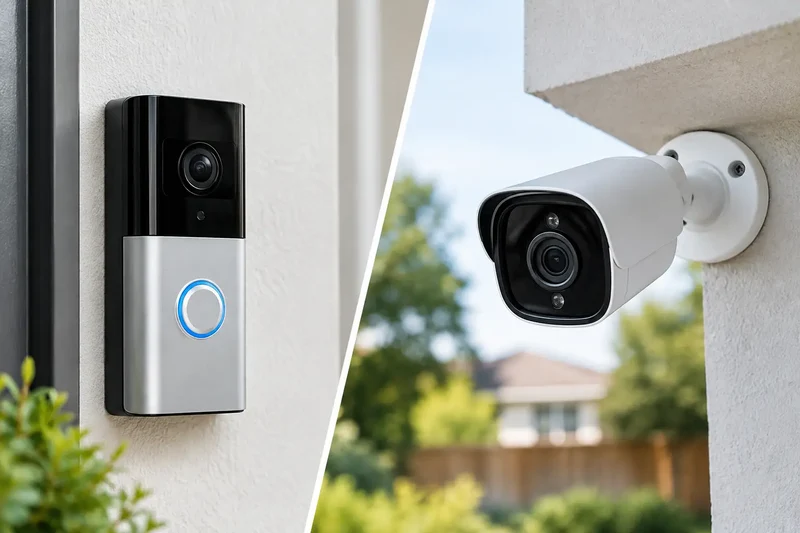
A smart video doorbell is one of the most useful starting points for a connected home security system.
These devices combine a doorbell with a camera, microphone and speaker. When somebody approaches your front door or presses the button, you can receive an alert on your smartphone.
Depending on the model, features may include:
- Live video from your front door.
- Two-way audio to speak to visitors.
- Motion detection and notifications.
- Night vision.
- Recorded video clips.
- Package and visitor detection.
Some products require a subscription to access recorded footage or advanced features, while others offer local storage options.
What to consider: Check Wi-Fi coverage at your front door, battery life, subscription costs and whether the device works with your preferred smart home platform.
2. Smart Outdoor Security Cameras
Outdoor cameras allow you to monitor areas such as driveways, gardens, entrances and garages.
Many modern cameras offer high-definition video, night vision, motion detection and smartphone notifications.
Useful features to compare include:
- 1080p, 2K or 4K video resolution.
- Colour or infrared night vision.
- Weather resistance.
- Motion detection zones.
- Local or cloud video storage.
- Wired, battery-powered or solar-assisted operation.
Think about where cameras will provide the most useful coverage. A camera positioned at an entrance may be more valuable than several cameras pointing at the same area.
UK privacy consideration: Position cameras carefully so they capture your property rather than unnecessarily recording neighbouring homes or public spaces. If your cameras capture beyond your property boundary, data protection obligations may apply.
3. Smart Indoor Cameras
Indoor cameras can provide additional visibility when you’re away from home.
Depending on the product, they may offer motion alerts, two-way communication, night vision and privacy modes.
Some models allow you to physically cover the lens or automatically disable recording when authorised household members are home.
Before purchasing, consider:
- Whether recordings are stored locally or in the cloud.
- Whether a subscription is required.
- Whether the camera supports privacy controls.
- Who can access the camera account.
- How long recordings are retained.
Avoid placing cameras in private areas such as bathrooms or bedrooms.
4. Smart Door and Window Sensors
Contact sensors are small devices that detect when a door or window is opened.
They usually consist of two parts: one attaches to the frame and the other to the moving door or window.
When the two parts separate, the system can send an alert or trigger an automation.
For example, you could receive a notification if a ground-floor window is opened while you’re away.
They can also work alongside compatible smart alarms and other home automation devices.
Why they’re useful: They provide a simple way to monitor entry points without needing a camera in every room.
5. Smart Motion Sensors
Motion sensors detect movement within a particular area.
They can be used for security alerts, but they’re also useful for everyday automation.
Examples include:
- Switching on hallway lighting when somebody walks past.
- Sending an alert when movement is detected in a selected room.
- Activating compatible security routines.
- Triggering lighting outside when somebody approaches.
Check the detection range, placement requirements and compatibility with your existing smart home equipment.
6. Smart Alarms and Security Systems
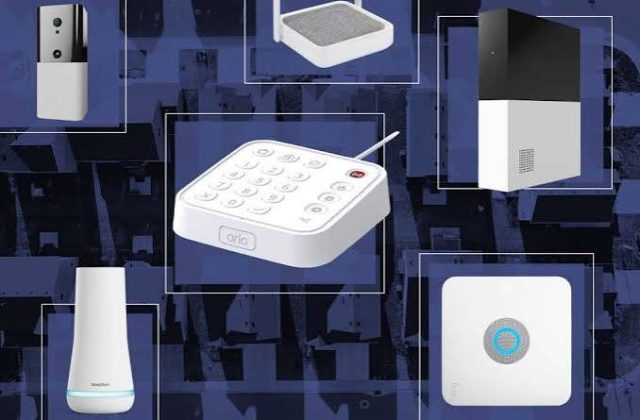
A smart alarm system can bring several security devices together.
Depending on the system, it may include:
- A central hub.
- Door and window sensors.
- Motion detectors.
- Internal sirens.
- External sirens.
- Smartphone notifications.
- Professional monitoring options.
Some systems operate independently, while others integrate with wider smart home platforms.
Before buying, check whether the alarm can operate during an internet outage, what happens during a power cut and whether cellular backup is available.
A smart alarm should complement sensible physical security, including good locks and secure doors and windows.
7. Smart Security Lighting
Security lighting is often overlooked, but it can be a useful addition to a home security setup.
Motion-activated outdoor lights can illuminate entrances, paths and gardens when movement is detected.
Some smart lights can also be controlled remotely or scheduled to operate at particular times.
Consider weather resistance, brightness, detection range and whether the lights require an existing outdoor electrical connection.
Building a Sensible Smart Security Setup
You don’t need to purchase every device immediately.
A practical starting setup might include:
Basic setup
- One video doorbell.
- One or two entry-point sensors.
- A smart security light.
Intermediate setup
- Video doorbell.
- Outdoor camera.
- Door and window sensors.
- Motion sensor.
- Compatible smart alarm.
More comprehensive setup
- Multiple strategically positioned cameras.
- Video doorbell.
- Sensors across important entry points.
- Smart alarm with backup options.
- Security lighting.
- Centralised monitoring and automation.
The right setup depends on your property, budget, Wi-Fi coverage and the areas you want to monitor.
Important UK Privacy and Security Advice
Smart security devices collect information about your home and its surroundings, so privacy should be part of your buying decision.
Keep these points in mind:
- Use strong, unique passwords.
- Enable two-factor authentication.
- Keep device firmware updated.
- Restrict access to camera accounts.
- Review recording and retention settings.
- Position cameras responsibly.
- Check the manufacturer’s privacy policy.
- Consider whether cloud storage is worth the ongoing cost.
For cameras that capture beyond your property boundary, consult the Information Commissioner’s Office guidance on domestic CCTV and data protection.
Final Thoughts
Smart home security doesn’t need to be complicated or expensive.
A video doorbell, a couple of sensors and suitable outdoor lighting can provide a useful starting point. From there, you can gradually expand into cameras and a connected alarm system.
The most important thing is choosing reliable devices that work together, protect your privacy and solve genuine security problems around your home.
At SmartHomeNest UK, we’ll continue exploring smart security products, practical home technology and ways to make connected living simpler.
SmartHomeNest UK – Smarter Living. Safer Homes. Better Technology.